Uptime



Uptime middleware for Fiber that records in-process heartbeat history and serves a lightweight status page.
Compatible with Fiber v3.
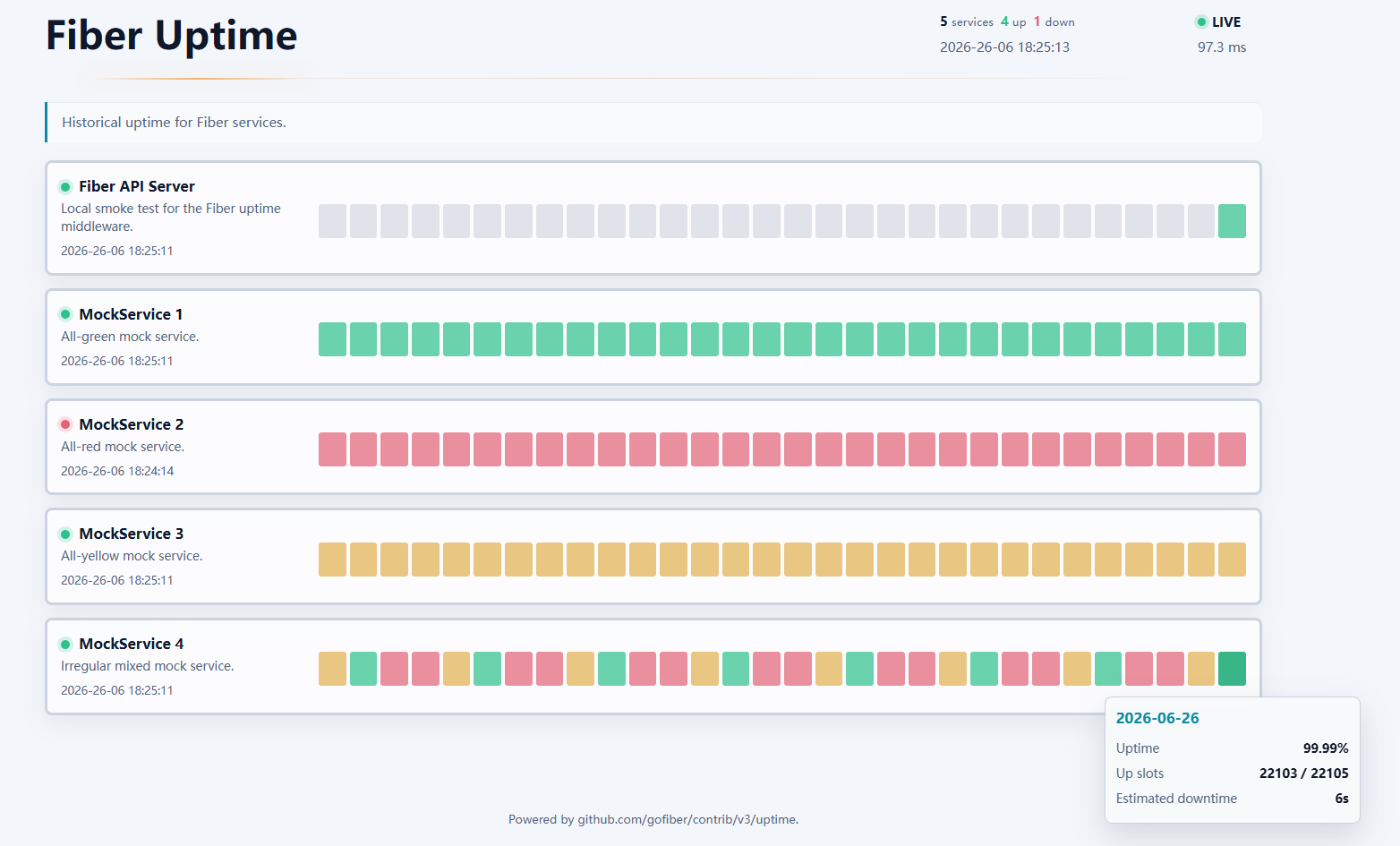
Preview
Install
go get -u github.com/gofiber/fiber/v3
go get -u github.com/gofiber/contrib/v3/uptime
go get -u github.com/gofiber/storage/redis/v3
Signature
uptime.New(config ...uptime.Config) fiber.Handler
uptime.NewRedisStore(ctx context.Context, cfg uptime.RedisStoreConfig) (storage.Store, error)
uptime.RemoveService(ctx context.Context, store *fiberredis.Storage, keyPrefix, serviceID string) error
Basic usage
package main

import (
	"github.com/gofiber/contrib/v3/uptime"
	"github.com/gofiber/fiber/v3"
	"github.com/gofiber/fiber/v3/log"
	fiberredis "github.com/gofiber/storage/redis/v3"
)

func main() {
	app := fiber.New()
	store := fiberredis.New()
	app.Hooks().OnPostShutdown(func(_ error) error {
		return store.Close()
	})

	app.Use(uptime.New(uptime.Config{
		App:         app,
		Store:       store,
		ServiceID:   "api",
		ServiceName: "API",
	}))

	app.Get("/", func(c fiber.Ctx) error {
		return c.SendString("ok")
	})

	log.Fatal(app.Listen(":3000"))
}
Open:
http://localhost:3000/uptimehttp://localhost:3000/uptime/api/status
Endpoint probes
By default, uptime records a heartbeat for the current process identified by
ServiceID. You can also configure HTTP endpoints. Each endpoint is shown as a
separate service on the dashboard and in the JSON API.
app.Use(uptime.New(uptime.Config{
	App:   app,
	Store: store,
	Endpoints: []uptime.EndpointConfig{
		{
			ID:                  "api-health",
			Name:                "API Health",
			URL:                 "https://api.example.com/health",
			Method:              "GET",
			Interval:            10 * time.Second,
			Timeout:             3 * time.Second,
			ExpectedStatusCodes: []int{200, 204},
		},
	},
}))
When ExpectedStatusCodes is empty, any 2xx or 3xx response is considered
up. Failed probes do not write heartbeat slots, so the endpoint naturally moves
to yellow, red, or down as slots are missed.
Every instance runs its own probes, so N replicas sharing a StorageKeyPrefix
send N times the probe traffic to each target. A slot counts as up when any
replica saw the endpoint up.
The first probe runs when New is called, before app.Listen has opened the
port. Endpoints pointing at the app's own routes therefore miss their first
slot or two on startup.
Redis
Redis state is stored through github.com/gofiber/storage/redis/v3. Create the
Fiber Redis storage in your app and pass it to the uptime config. By default,
that storage package connects to 127.0.0.1:6379 and database 0.
store := fiberredis.New(fiberredis.Config{
	Addrs:    []string{"127.0.0.1:6379"},
	Password: "",
	Database: 0,
})
app.Hooks().OnPostShutdown(func(_ error) error {
	return store.Close()
})

app.Use(uptime.New(uptime.Config{
	App:              app,
	Store:            store,
	ServiceID:        "api",
	StorageKeyPrefix: "fiber:uptime",
}))
The middleware uses Conn() from the Fiber Redis storage to run the uptime
queries it needs. Use a dedicated Redis database or a distinct
StorageKeyPrefix when multiple environments share the same Redis server. The
caller owns the Redis storage lifecycle. Close the Redis storage after the
Fiber app has shut down, for example from OnPostShutdown, so uptime can stop
its background recorders first.
When multiple uptime instances share the same Redis database and
StorageKeyPrefix, use the same Timezone and heartbeat or probe interval for
the same ServiceID or endpoint ID. If those settings need to differ, use
distinct service IDs, endpoint IDs, or storage prefixes.
Using the Redis store without middleware
NewRedisStore returns the public
github.com/gofiber/contrib/v3/uptime/storage.Store, initialized and ready for
concurrent queries and writes without middleware. Invalid configuration or
initialization failure returns a nil store and an error.
package main

import (
	"context"
	"fmt"
	"log"
	"time"

	"github.com/gofiber/contrib/v3/uptime"
	fiberredis "github.com/gofiber/storage/redis/v3"
	"github.com/redis/go-redis/v9"
)

func main() {
	client := redis.NewClient(&redis.Options{
		Addr:                  "127.0.0.1:6379",
		ContextTimeoutEnabled: true,
	})
	defer client.Close()
	redisStorage := fiberredis.NewFromConnection(client)
	defer redisStorage.Close()
	ctx, cancel := context.WithTimeout(context.Background(), 5*time.Second)
	defer cancel()
	store, err := uptime.NewRedisStore(ctx, uptime.RedisStoreConfig{
		Store:            redisStorage,
		StorageKeyPrefix: "fiber:uptime",
		RetentionDays:    90,
	})
	if err != nil {
		log.Print(err)
		return
	}
	services, err := store.ListServices(ctx)
	if err != nil {
		log.Print(err)
		return
	}
	fmt.Printf("%d services\n", len(services))
}
Initialization passes the context to Redis; network timeouts still depend on the
client configuration. ContextTimeoutEnabled, used above with
fiberredis.NewFromConnection, enables go-redis to apply context deadlines to I/O.
Cancellation does not guarantee an immediate return. On initialization failure,
errors.Is can inspect both the underlying error and any ctx.Err().
An empty StorageKeyPrefix defaults to fiber:uptime. Prefix normalization matches the
built-in backend, trimming leading/trailing colons. Zero RetentionDays defaults
to 90; negative values or an overflowing TTL are rejected. State expiry follows
Key expiry; instance metadata expires after 24 hours. The factory starts
no workers, HTTP service, or automatic maintenance. The store can also be passed
to Config.Storage; match its retention setting to the factory's.
UpsertService, UpsertInstance, WriteHeartbeat, RollupDaily, and Cleanup
modify monitoring data. Coordinate changes to records used by an active monitor,
and use its Redis database, key prefix, and retention settings. Multiple queries
do not form a transactionally consistent snapshot.
The caller owns the Fiber Redis storage and any separately borrowed client. The factory never closes them, even on failure. Close them after all users have stopped.
Key expiry
Service, sample and daily keys carry a TTL of RetentionDays + 1 days that is
re-armed on every write. Background maintenance normally removes them long
before that, so the TTL only matters once no process is left to run the
cleanup: a decommissioned service, a changed key prefix, an app that never
comes back. Without it those keys would stay in Redis forever.
The services registry set is shared by all instances under a prefix and is
never expired. Service hashes receive a TTL when registered, even before their
first heartbeat. Use RemoveService to clear a service and its registry entry.
Removing a service
When using the built-in Redis Store path, the dashboard lists every service
found under StorageKeyPrefix, not just the ones in the current config.
Services are never dropped automatically while their retention window keeps
being refreshed, so renaming ServiceID or an endpoint ID, or removing an
endpoint, leaves the old identifier behind as a row that reports down forever.
Delete it explicitly:
err := uptime.RemoveService(context.Background(), store, "fiber:uptime", "old-endpoint-id")
Pass the same StorageKeyPrefix the middleware or NewRedisStore uses, or "" for the default.
This removes the service, its history and its raw samples.
Remove the service from your config and restart before calling it. Calling it while the service is still being recorded takes it off the dashboard for good, but in-flight heartbeats will recreate partial keys; those carry the TTL above and expire on their own.
RemoveService applies to the built-in Redis path and data written through
NewRedisStore. Other custom storage backends may expose their own removal operation.
Custom storage
For most users, the built-in Redis Store path remains the simplest
integration. Storage is the advanced extension point for applications
that need a custom persistence backend. Provide an implementation of
github.com/gofiber/contrib/v3/uptime/storage.Store through Storage:
app.Use(uptime.New(uptime.Config{
	App:       app,
	Storage:   myStore,
	ServiceID: "api",
}))
Custom stores must be ready before calling uptime.New and safe for concurrent
use. The caller owns their lifecycle and should close underlying resources
after the Fiber application has shut down; uptime does not close custom stores.
Store and Storage are mutually exclusive, and StorageKeyPrefix applies
only to the built-in Redis Store path. Redis remains the built-in storage
integration.
Snapshots and custom UI
The dashboard and JSON API share an in-memory snapshot, limiting backing-store
work on public status routes. It is held for one SampleInterval, or for the
shortest interval any service in it is tracked at when an endpoint is probed
faster than that, so a snapshot is never served past the point where its own
current_status would have changed.
If a refresh fails, the last snapshot is served with storage.status set to
degraded and the same fixed last_error label the live status uses; the
backing store's own message goes to the log rather than the public payload. A
failed refresh restarts the interval like a successful one, so an outage cannot
turn every request into another attempt against the unavailable store.
The same snapshot payload is available at UI.Path + "/api/status" for custom
dashboards.
The built-in dashboard polls that endpoint every SampleInterval, but no more
often than every 10 seconds. It stops polling while its browser tab is hidden
and refreshes as soon as the tab is visible again, so a forgotten tab does not
keep reading the backing store. A request that fails, or takes longer than the
polling interval and is aborted, marks the dashboard STALE while the last
successful snapshot stays on screen. ERROR means the API reported a storage
problem. Screen readers are told when the LIVE, STALE, or ERROR state
changes, but not on every refresh.
Service insights
Each service card has an Insights button, collapsed by default. Expanding
it shows four metrics and a daily availability trend for the same DaysToShow
window as the existing uptime bars:
- Availability: total up slots divided by total expected slots across valid days, rather than an average of daily percentages.
- Downtime: the sum of the daily estimated downtime.
- Affected days: valid days with at least one missed expected slot.
- Stable streak: consecutive perfect days backward from the newest valid
day, including today when every completed expected slot so far is up. Newest
no-data days are skipped; an internal no-data gap or imperfect day stops the
streak.
N+ daysmeans it reaches the window boundary and the service existed before that window, so the streak may be longer.
Days without data or expected slots do not contribute to the metrics and are
not treated as downtime. With no valid days, all four metrics display —, and
the trend displays No data. Missing days create gaps in the trend.
Expanded cards stay expanded across automatic refreshes; reloading the page collapses them again. Charts are rendered only while expanded. The trend uses native SVG and Vanilla JavaScript, with zero additional dependencies, storage queries, or persistent data. Existing daily bars remain keyboard accessible. The trend's gridlines use round percentages, it exposes its latest and lowest values to assistive technologies, and on touch screens a tap or horizontal drag on it shows a day's values.
Each service in the status JSON also includes a summary object with
has_data, availability_rate, estimated_downtime_seconds, affected_days,
stable_streak_days, and stable_streak_capped. When has_data is false, the
numeric fields are zero and stable_streak_capped is false; clients should
display no data rather than 0% availability. These metrics add no latency,
incident, or alerting semantics and require no new configuration.
Dashboard favicon
The built-in dashboard includes an embedded favicon by default. Set
UI.FaviconURL to override it with either a root-relative path served by the
same application or an absolute HTTP(S) URL:
app.Use(uptime.New(uptime.Config{
	App:       app,
	Store:     store,
	ServiceID: "api",
	UI: uptime.UIConfig{
		FaviconURL: "/assets/favicon.svg",
	},
}))
Filesystem paths such as ./favicon.ico are not supported directly.
Expose a local file through a Fiber route or static handler, then configure its
URL. Remote favicon URLs cause each dashboard visitor's browser to contact that
remote host, so a same-origin URL is preferred for private deployments.
Config
| Property | Type | Description | Default |
|---|---|---|---|
| App | *fiber.App | Fiber app used to register the shutdown hook that closes the uptime runtime. | Required |
| Next | func(fiber.Ctx) bool | Skip the uptime handler when true. | nil |
| ServiceID | string | Stable service identifier for the current process. Required only when Endpoints is empty. | "" |
| ServiceName | string | Display name. | ServiceID |
| ServiceDescription | string | Display description. | "" |
| Endpoints | []uptime.EndpointConfig | Optional HTTP endpoints to probe as tracked services. | nil |
| SampleInterval | time.Duration | Heartbeat interval. | 3 * time.Second |
| RetentionDays | int | Days to retain daily history; zero uses the default, negative values are invalid. Redis requires at most 106750 days to fit its expiry backstop in time.Duration; custom Storage has no Redis-specific limit. | 90 |
| DaysToShow | int | Number of days shown in snapshots and dashboard. | 30 |
| Timezone | *time.Location | Timezone for day and slot boundaries. | time.Local |
| NodeID | int64 | Optional node value used for generated instance IDs. | 0 |
| InstanceID | int64 | Explicit process instance ID. | Generated |
| IDGenerator | uptime.IDGenerator | Custom instance ID generator. | nil |
| Store | *fiberredis.Storage | Fiber Redis storage instance from github.com/gofiber/storage/redis/v3. | Required unless Storage is set. |
| Storage | storage.Store | Custom uptime storage backend. | Required unless Store is set. |
| StorageKeyPrefix | string | Prefix for uptime Redis keys. Applies only when Store is used. | "fiber:uptime" |
| UI | uptime.UIConfig | Dashboard copy, favicon, and thresholds. FaviconURL accepts a root-relative path or absolute HTTP(S) URL. Threshold values are configurable in (0, 1]; zero uses the defaults. | Embedded favicon, light English UI, green at 99.9%, yellow at 99% |
EndpointConfig
| Property | Type | Description | Default |
|---|---|---|---|
| ID | string | Stable endpoint identifier. | Required |
| Name | string | Display name. | ID |
| Description | string | Display description. | "" |
| URL | string | Absolute http or https URL to probe. | Required |
| Method | string | HTTP method used for the probe. | GET |
| Headers | map[string]string | Optional request headers sent with each probe. | nil |
| ExpectedStatusCodes | []int | Status codes that mark the endpoint up. Empty means any 2xx or 3xx. | nil |
| Interval | time.Duration | Endpoint heartbeat interval. | Config.SampleInterval |
| Timeout | time.Duration | Maximum duration for one probe. | 5 * time.Second |
Handler behavior
The Fiber handler serves:
/uptime/uptime//uptime/api/status
GET and HEAD are supported. Other methods return 405 Method Not Allowed.
Requests outside UI.Path, including unknown uptime subpaths, are passed to the
next handler.
The handler matches request paths against UI.Path (default /uptime).
When mounted under a Fiber group or Use prefix, the match is relative to that
mount point.
The middleware does not read request bodies, capture response bodies, or wrap business handlers. Process heartbeats and endpoint probes are run by background tickers owned by the uptime runtime.
Performance notes
Store writes and endpoint probes happen on background tickers, not on every business request. Status requests read the backing store to build the response. Use Fiber's cache middleware if the dashboard or JSON API should be cached.
Concurrency safety
Uptime middleware instances are safe for concurrent use after construction. The snapshot payload is built from fresh store reads. Redis commands are issued through the Fiber Redis storage connection and are safe for concurrent use by the background recorder and Fiber handlers.
Config.App is required so New can register a Fiber shutdown hook that stops
the uptime runtime. The caller owns the Redis storage lifecycle and should close
it after the app has shut down, for example from OnPostShutdown or a signal
handler that closes Redis after app.Shutdown returns.
Security notes
Mount the dashboard on an internal or protected route when uptime history should not be public. The middleware does not log request bodies, response bodies, authorization headers, cookies, or query strings. Endpoint probe response bodies are closed without being read. Avoid putting secrets in endpoint URLs because URLs may still appear in upstream infrastructure logs outside this middleware.